

BLACKMAGIC DESIGN ATEM Mini Extreme
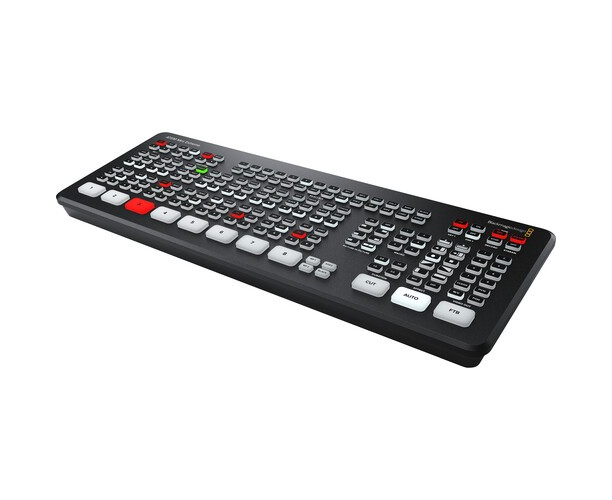
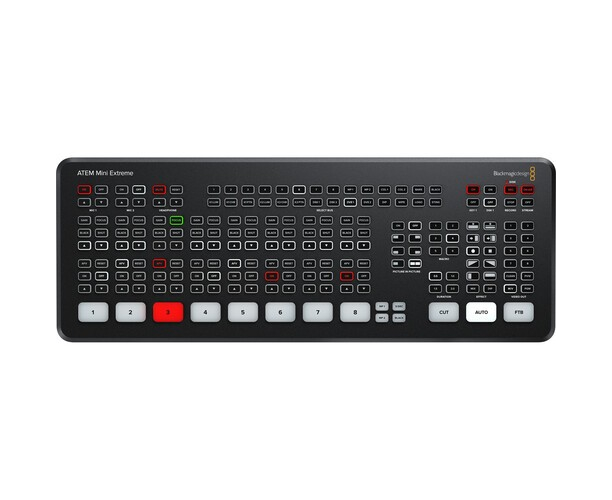
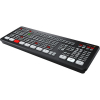
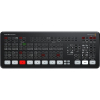
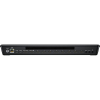
A considerably larger model of your ATEM Mini live production switcher. This new model is the company's most advanced 1 M/E switcher with 8 inputs, 4 ATEM Advanced Chroma Keyers, a total of 6 independent DVEs, 2 media players, 2 downstream keyers, 16 multiview modes, 2 USB connections and multiple auxiliary HDMI outputs.
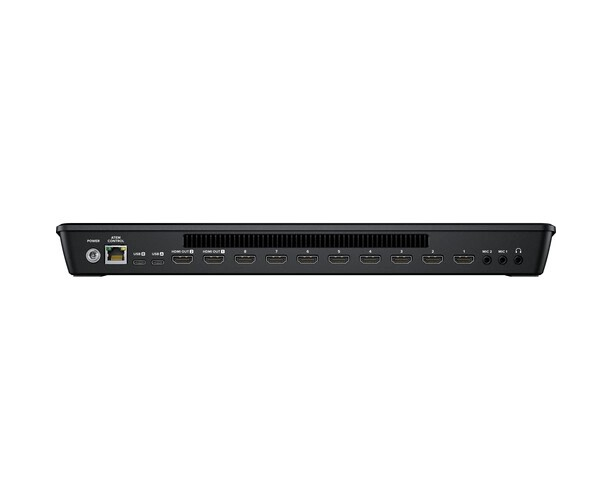
On ATEM Mini Pro and Extreme models, customers also get buttons for recording and streaming control, as well as select buttons that allow you to change the video output between cameras, program and multiview. On the rear panel, there are HDMI connections for cameras or computers, additional microphone inputs, USB for webcam output, and HDMI aux output for program video .
ATEM Mini Pro and ATEM Mini Extreme models include a built-in hardware based streaming engine for live streaming over your ethernet connections. This means that customers can live stream to YouTube, Facebook, and Twitch in higher quality, with no dropped frames and with simpler settings. Simply select the streaming service and enter the streaming key. There are palettes in ATEM Software Control for setting up streaming. The streaming status is also displayed in multiview. The streaming status is easy to understand as the data rate indicator shows the internet speed required for the video format that customers are using. If users are more technically savvy, customers can update streaming profiles in an XML settings file to load new services.
If users are doing live production on location, then ATEM Mini Pro and Extreme models support plugging an Apple or Android phone into the USB port to use mobile data. This also acts as an excellent backup for the primary Ethernet connection. Tethering with a phone works with the latest 5G high-speed mobile phones and also more common 4G handsets. The ATEM switcher will automatically detect when a phone is connected and change your internet connection to use it, without the need to change settings. When connected, the phone will be powered by the USB port so that it remains charged through the switcher. By using tethering and mobile data with your phone, ATEM Mini Pro and ATEM Mini Extreme can become the perfect mobile production solutions.
ATEM Mini Pro and Extreme models also support direct recording of streaming data to USB flash drives. This means that customers get very long-duration recordings on the same H.264 video files with AAC audio that they streamed, so they can upload directly to any online video site, such as YouTube or Vimeo. Recording to multiple drives is also supported when used with a USB hub or Blackmagic MultiDock, so when a first drive is filled, recording can continue on a second drive uninterrupted. Recording settings and drive selection are set in ATEM Software Control. And you can also track the recording status in the built-in multiview .
ATEM Mini Extreme also adds a headphone jack.
The HDMI output can be selected to display a full multiview . ATEM Mini Extreme models include 4 upstream chroma keyers so customers can build amazing virtual sets. With four independent chroma keyers, customers get one keyer per camera and can create a virtual set for up to four cameras. With ATEM Mini Extreme customers have eight inputs, four to use with the cameras and four that can be connected to a computer with the virtual set and backgrounds rendered. Alternatively, customers do not need to move their cameras and can create virtual sets with the camera fixed by uploading backgrounds with pre-rendered images from the media players and media pool. Customers can set macros to change cameras and load the correct background on the media players. And even use a DeckLink Quad HDMI and applications for live virtual sets.
In addition to two independent DVEs on the ATEM Mini Extreme models, there's also a powerful multi-layer SuperSource processor with four additional DVE layers and a background layer, all of which appear as an additional input source on the ATEM Mini Extreme. Any video input from ATEM Mini Extreme can be used for each SuperSource DVE, then it's layered on top of a custom background from the media pool. SuperSource is also ideal for simultaneous picture-in-picture views of multiple respondents because customers can set up the effect before airing it while keeping the two main DVEs free for other tasks. Having a SuperSource is like having an additional built-in multi-layer VFX switcher!
When performing larger live productions with multiple cameras, it is very useful to view all video sources at the same time on a single monitor. ATEM Mini Pro and ATEM Mini Extreme models feature professional multiview so you can keep track of all your video inputs, as well as the program and preview on a single monitor or HDMI TV. All camera views include tally indicators to let customers know when each source is on air. Each display also features custom labels and audio meters. Plus, ATEM Mini Extreme models allow customers to select up to 16 custom views. Multiview also includes recording, streaming, and Fairlight audio mixer status information.
The ATEM Streaming Bridge is a video converter that allows customers to receive an H.264 stream from any ATEM Mini Pro or ATEM Mini Extreme and convert it to SDI and HDMI video. This means that customers can send video to remote locations around the world over their local Ethernet network or via the internet internationally. This is possible because it utilizes advanced H.264 codecs for superior quality at very low data rates. Setup is easy and the ATEM software utility can create configuration files that customers can email to their remote studios .
"These two new ATEM Mini models represent a significant increase in creative capabilities and are now our most powerful 1 M/E switchers," said Grant Petty, CEO of Blackmagic Design. "With our ATEM Mini customers really pushing the boundaries in live production, we feel like they're innovating in new and interesting ways and inventing new workflows that we've never seen before. We thought it was important to create a new ATEM Mini model that could take features far beyond what's available today so our customers can continue to innovate these new workflows. These new models are big, powerful, and remain incredibly affordable.
ATEM Mini Extreme and ATEM Mini Extreme ISO Features
- Miniaturized control panel-based design.
- Supports connection to up to eight cameras or computers.
- Supports Ethernet streaming or tethering with phones via USB.
- Tethering with 5G or 4G phones for remote mobile transmissions.
- Writes to USB flash drives in H.264.
- Two stereo audio inputs for connecting desktop and lavalier microphones.
- Automatic conversion and resynchronization on all HDMI inputs .
- Includes free ATEM Software Control for Mac and Windows.
- Media pool for 20 RGBA graphics files for titling, opening backgrounds, and logos.
- Includes four advanced ATEM chroma keyers for green/blue screen jobs.
- Two independent DVEs plus SuperSource with 4 additional DVEs .
- 16 multiview modes for monitoring all cameras, recording and streaming status.
Low-cost multi-camera live production with broadcast capabilities
The new ATEM Mini makes it easy to create professional multi-camera productions for live streaming on YouTube or innovative business presentations via Skype.
Just plug in ATEM Mini and you can make live cuts between four high quality camcorder inputs with significantly superior images.
You can even connect a computer to present PowerPoint slides or add a video game console.
The built-in DVE can also be used for amazing picture-in-picture effects, perfect for live commentary.
There are several video effects too! For live streaming, ATEM Mini has a USB output that doubles as a webcam, so it can connect to any
video software.
It has HDMI video output for projectors! With the microphone inputs, you can use high-quality desktop microphones and lavalier microphones for interviews and presentations.
ATEM Mini even includes amazing broadcast features that let you do high level work .
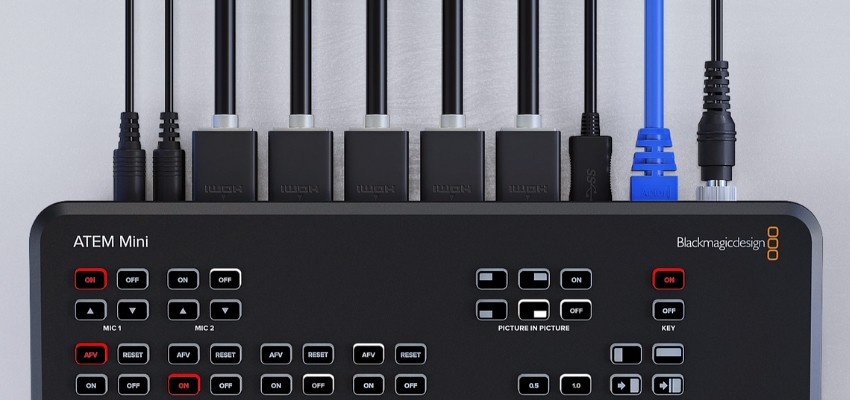
ATEM Mini has a compact control panel based design with all video, audio and control connections on the back panel. The front panel includes easy-to-use buttons that allow you to select sources, adjust audio inputs, as well as select video effects and transitions. The back panel includes HDMI inputs for connecting cameras or computers, as well as additional microphone inputs . The program output from ATEM Mini is sent via HDMI video as well as via USB to the webcam output. The front panel buttons are large and easy to use by feel, so you can even use the switcher and present at the same time. You also have buttons to perform live audio mixing. The fade to black button, "FTB", allows you to apply the fade down effect at the end of your program.
ATEM Mini is very easy to use because you only need to press one of the input buttons numbered 1 to 4 on the front panel to switch or cut between video sources. You can choose between dry cuts or effect transitions by selecting the "Cut" or "Auto" buttons on the panel. Unlike dry cut, the "Auto" button instructs ATEM Mini to use a predetermined video effect when switching between inputs. You can choose between exciting transitions such as a traditional dissolve or more dramatic effects such as color dips, DVE effects to shrink and push images. The DVE is perfect for picture-in-picture effects, and you can set up different picture positions instantly via the buttons on the control panel. You also have a frame memory for titles and graphics that can be accessed through the external control app .
ATEM Mini is perfect for interviews because it can connect multiple cameras and get close-ups of the presenter, interviewee and wide shots, not to mention that ATEM Mini is so compact that the presenter can even operate it in small studios. You can record via the HDMI output or live stream using the Open BroadCaster software.
Skype will identify ATEM Mini as a webcam, which means you get considerably superior presentations worthy of multi camera broadcast studios. Connect a close-up camera, a close-up camera, and a computer for PowerPoint presentations. You can even make your presentation on the slides with picture-in-picture effects.
Stream live eSports competitions on Twitch by simply connecting multiple video game consoles and a camera for the announcer. ATEM Mini operates at up to 60 frames per second so you get fast gameplay and can use the picture on picture effect for commentary. You can even download titles straight from Photoshop!
Increase the professionalism of your submissions to Kickstarter and investors to fund your new product idea. Connect a camera for the presenter, a camera for the product close-up, and a computer for the business plan slides. Then, give a live presentation via Skype or post the recordings on the internet for investors to watch later .
ATEM Mini is perfect for educational videos! Setup is quick and easy, so you can travel to locations and record live multi-camera video productions on a wide variety of educational topics. Connect computers and cameras and use the ATEM Software Panel to load titles and run video effects .
With four independent HDMI inputs, you can connect up to four high-quality home video cameras. Video cameras with HDMI outputs are dramatically higher quality than conventional webcams, as they use higher quality lenses and have much better low light sensitivity . All connected sources will be re-synced to the switcher if they are operating on different video standards, meaning all inputs work seamlessly and you can handle unfamiliar equipment if you are visiting new facilities or locations. Because HDMI-compatible cameras often support interchangeable lenses, you can use wide-angle lenses for wide shots and zoom lenses for close-ups. Imagine having the low-light performance of professional cameras in theatrical productions and music videos !
To ensure the maximum possible compatibility, ATEM Mini has a USB connection that works just like a conventional webcam input. That is , you can connect and start working with any video software instantly. The software is tricked into thinking that ATEM Mini is a regular webcam, but it's actually a live production switcher. This ensures full compatibility with all full resolution 1080HD quality programs. Choose any software you like, such as Open Broadcaster for live streaming, or Skype for peer-to-peer presentations. ATEM Mini supports shows and platforms like Open Broadcaster, XSplit Broadcaster, YouTube Live, Facebook Live, Skype, Twitch TV, Periscope, Livestream, Wirecast and more .
The biggest advantages of ATEM Mini are the professional production values, which are made possible by a number of built-in video effects. The "Cut" button ensures a dry cut when switching between sources. The "Auto" button, found on large broadcast switchers, provides video transitions with effects. There are also video effects duration buttons, offering 0.5, 1, 1.5, and 2 second settings. You can also select the type of effect you want, including fade, which smoothly transitions between fonts, and dip, which fades via a color during the transition. Or use fun DVE effects that move the image off-screen while transitioning between sources.
The HDMI program output is perfect for connecting ATEM Mini to an external recorder or monitor. ATEM Mini is compatible with recorders such as HyperDeck Studio Mini and Blackmagic Video Assist. You get a high-quality output that contains the program video from the switcher and the live audio from the internal mixer. The HDMI output can even be connected to video projectors in larger spaces. If you connect the ATEM Software Panel, you can even change the HDMI output directly from any of the video inputs. There is also a low latency setting that allows you to output video game consoles connected to the HDMI output. If you enable the M/E broadcast mix style, the HDMI output can be used to preview sources before a transition.
With two independent 3.5mm stereo audio inputs, you can connect desktop and lavalier microphones. You can even connect a music player to play the intro music after the live stream starts , but before the program itself starts. With two additional stereo audio inputs, you can ensure that both the presenter and the guest can use lavalier microphones in interviews. All ATEM Mini audio inputs include buttons on the panel to adjust the audio level and activate inputs on the audio mixer. ATEM Mini has a full Fairlight audio mixer. In addition, all HDMI audio inputs and both microphone inputs are connected to the audio mixer separately, so you can live mix from all audio sources .
ATEM Mini has an easy to use front panel, however it also includes very powerful broadcast capabilities allowing for a truly professional production workflow. If you're looking for a career in the television industry, ATEM Mini is perfect to learn because it has the same features as the switchers used in high-end broadcast studios. You get a full ATEM Advanced Chroma Key, full Fairlight audio mixer, full DVE, graphics frame memory and more. Just run the free ATEM Software Control app on your Mac or Windows when connecting via USB or Ethernet to access the additional features of ATEM Mini. With a little experimentation, you can learn how to create broadcast-quality live productions. ATEM Mini is a true broadcast switcher hidden in a super compact and affordable design!
The free ATEM Software Control app for Mac and Windows unlocks the full potential of ATEM Mini, giving you full control over the switcher's capabilities. The ATEM Software Control Panel has a visual switcher interface with parameter palettes to make quick adjustments. While you can usually connect via USB, connecting via Ethernet nevertheless allows multiple users to connect to ATEM Mini using separate copies of ATEM Software Control on different computers. Through the software, it is possible to access all the features of the audio mixer, including effects, loading still frames and even advanced macro programming. You can save the switcher state as XML files. If you need to play clips, you can even control HyperDeck disc recorders via Ethernet.
ATEM Mini has a Full HD digital video effects processor, often known as a "DVE", which allows you to perform picture-in-picture effects and DVE transitions. With DVE, you can create professional PiP effects with custom 3D borders, shadows, and lighting. Image quality is the same as the high-end ATEM switcher models, and the DVE lets you position, resize, rotate and scale live video in real time. The DVE can also be used to create amazing transitions with eight different effects to shrink and push the image, making your programming more interesting. The DVE includes a "flying key" that can be used with custom graphics to create transitions with graphic wipes.
ATEM Mini includes a wide range of native HD broadcast quality transitions like blend, dip, wipe and more. All transitions can be customized by adjusting parameters such as duration, border color , border width, position, and direction. You can also use DVE in transitions, allowing a graphic to move over the edge of the wipe, which is called a graphic wipe, which is often used in sports programming. To avoid mistakes, ATEM Mini has a preview feature so you can check your transitions before you take them on air.
The built-in "media pool" allows you to upload up to 20 RGBA-quality graphics files for titling, opening backgrounds, and logos. A single media player is used to output the selected graphic, so it appears as an additional internal video input, so you don't waste any of the physical HDMI video inputs for graphics. You can even use still frames for complex effects, such as graphic wipes. You can manage all your media using the included ATEM Software Control app, or download graphics directly from Photoshop using the ATEM Photoshop plug-in. ATEM Mini can even capture still frames from the video output and add them to the internal media pool. The Photoshop plugin is perfect for frequently changing graphics, such as scoreboards, as you can update the text and download it directly to the switcher, allowing the graphics to go live quickly.
ATEM Mini is the perfect choice for news and virtual scenarios because it includes an advanced ATEM chroma key for high quality chrominance or luminance keying, plus an additional linear downstream keyer. The chroma keyer is incredibly powerful and includes a color picker, with which users can get color samples from the background for automatic generation of key parameters. In addition to precise controls for edges and reflections, you get a foreground color corrector to match the "look" of the foreground layer to the background layer for perfect compositions. The keyer can also be used for DVE and standards keying, offering incredible versatility. You can even use it for title overlays. Just use PowerPoint or other software with a green or blue background and the keyer will eliminate the green and make the background transparent.
Although it comes standard set to "cut-bus" mode, ATEM Mini can also be switched to the "M/E" style of operation, which is the live production switcher mode most commonly used by large broadcasters. In cut-off bus mode, when selecting an input, the switcher instantly switches to that source. However, if you prefer to operate ATEM Mini in a more professional way, you can set the switcher to operate in "M/E" mode in the ATEM Software Control app. In the "M/E" style, the selected source will not be transmitted until you press the "Cut" or "Auto" button. This two-step process reduces the chance of errors as you can select the correct source before taking it on air. This mode of operation means that you can use any switcher on television stations, as they work in the same way.
With the built-in Fairlight audio mixer, ATEM Mini makes extremely complex live sound mixes possible. The internal mixer has a total of 12 channels, so you can mix audio from all inputs. Eight channels of the mixer are debuilt from the HDMI inputs, while another two channels of stereo audio enter through the 3.5 mm microphone connections on the rear panel. Each input channel features the highest quality six-band parametric compressor and equalizer, limiter, expander and noise reducer, as well as full panning. You can even set the software to mix inputs automatically when you turn on "AFV" or mix multiple live sources at the same time. All of this audio capability can be controlled through the ATEM Software Control app. You can also add a compatible Mackie panel or even a huge Fairlight Audio console.
You get four independent HDMI inputs, all with their own upconverter and crossover. This means that ATEM Mini will convert 1080p, 1080i and 720p sources to the switcher video standard automatically. By default, the switcher will set your video standard automatically. However, you can also configure the device to a specific video standard to ensure compliance with local broadcast standards. The HDMI output is a true auxiliary output, to which you can transmit each of the four HDMI inputs or the program feed. You can even switch input 1 directly to HDMI output and get low latency for eSports. If you select the professional M/E style of operation, you can also stream a preview feed, allowing you to check the source before transitioning to it.
The rear panel Ethernet connection offers excellent customized control solutions. Although ATEM Mini includes the ATEM Software Control app, you can use Ethernet to control ATEM remotely, even from another country. A very common workflow is to use Ethernet to allow ATEM Mini to be positioned close to the HDMI cameras, but the control is positioned remotely in a quieter space such as a control room. Imagine operating the switcher in a control room and setting up a professional studio where the control room is set back from the performance and interview space! Ethernet allows you to add as many panels as you want, all at the same time, or you can create custom solutions using the Developer SDK .
With Ethernet built in, ATEM Mini can take advantage of the wide range of ATEM control panels, enabling high level workflows that take advantage of the broadcast features included in the switcher. The physical ATEM control panels have a quick program/preview mode, which is the industry standard for controlling switchers. All transitions have direct access buttons, and you even have a lever to merge transitions manually. For precise DVE control, the joystick includes X, Y, and rotation positions for DVE size. You can use the LCD menus to control features that don't have dedicated rotary controls and buttons. You can even set up and trigger macros right from the dashboard! Upgrading your ATEM Mini with a professional control panel like the ATEM 1 M/E Advanced Panel means you'll be able to use professional techniques and you'll never be limited creatively.
Box Contents:
1x BLACKMAGIC ATEM Mini Extreme